

Microsoft Dynamics 365 Commerce Compliance
How Dynamics 365 Commerce Processes Invoices
- Commerce Data Capture: Microsoft Dynamics 365 Commerce supplies customer, product, order, pricing, tax, and transaction information for processing.
- Order Record Linking: Relevant commerce orders connect with customer and accounting records for coordinated invoice preparation and reconciliation.
- Invoice Detail Checking: Transaction information undergoes structured validation covering completeness, VAT details, customer data, Bulgarian requirements, and records relevant to the National Revenue Agency (NRA).
- Structured Invoice Creation: Verified commerce information is arranged into electronic invoice records for subsequent routing and document processing.
- Document Channel Routing: Prepared invoices follow supported electronic channels while maintaining processing visibility, response tracking, and transaction traceability.
- Sales Record Reconciliation: Completed invoices remain associated with originating commerce transactions for accounting review, reconciliation, and financial reporting.
Advintek Connectivity for Commerce Workflows
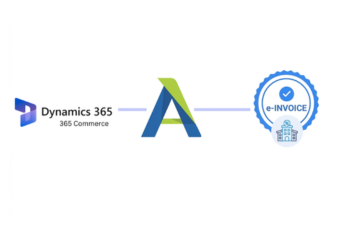
Advintek connects Dynamics 365 Commerce retail, order, product, customer, and financial information with Bulgarian e-invoicing workflows, supporting validated invoices and coordinated ERP processing.
- Connects retail orders with invoices
- Validates VAT and customer information
- Links sales records with accounting
- Tracks electronic invoice processing results
Commerce Benefits for Bulgarian Invoicing
- Connected Commerce Workflows: Sales, orders, customer records, and invoicing activities operate through coordinated ERP processes for stronger financial administration.
- Automated Data Verification: Commerce transaction details receive systematic checks before processing, helping identify incomplete or inconsistent invoice information.
- Centralized Invoice Monitoring: Teams can review document stages, validation outcomes, transmission activity, responses, and processing exceptions across workflows.
- Accurate Sales Reconciliation: Invoice records remain linked with originating orders and commerce transactions, supporting dependable accounting review and reconciliation.
- Product Transaction Alignment: Item information connects with sales and invoice records, improving consistency between commerce activity and financial documentation.
- Bulgarian Compliance Support: Structured workflows address relevant Bulgarian electronic invoicing and VAT processing requirements within connected commerce operations.
Bulgaria e-Invoicing Features for Commerce
Product Catalog Mapping
Associates product identifiers, descriptions, quantities, prices, and tax details with corresponding commerce transaction records.
Store Sales Coordination
Connects store-level sales information with orders, customers, invoices, and accounting references for unified processing.
Order Fulfillment Linking
Relates fulfillment transactions with invoice records, supporting accurate sales documentation and downstream financial reconciliation.
Microsoft Dynamics 365 Commerce in Bulgaria
Microsoft Dynamics 365 Commerce supports retail and omnichannel operations, while Advintek links store sales, customer orders, product transactions, and financial records with Bulgarian electronic invoicing workflows.
- Coordinate retail orders with invoices
- Align store sales with accounting
- Validate VAT information before processing
- Reconcile commerce transactions with invoices
Start Connected Bulgaria e-Invoicing Today
Connect retail transactions with structured Bulgarian invoice workflows today.
Start compliant commerce invoicing through Advintek.
Ready e-Invoice System
Frequently Asked Questions Microsoft Dynamics e-Invoicing Bulgaria
How does Microsoft Dynamics 365 Commerce support Bulgarian e-invoicing?
Microsoft Dynamics 365 Commerce contains important retail information such as orders, products, customers, prices, taxes, and sales transactions. Advintek connects this ERP data with Bulgarian e-invoicing workflows, helping structure invoice information, validate required fields, process NRA-relevant tax information, route documents, monitor responses, and associate processed invoices with originating commerce records.
What Commerce data can Advintek use for invoice generation?
Advintek can work with relevant Microsoft Dynamics 365 Commerce information including customer profiles, sales orders, product details, quantities, prices, VAT information, and transaction references. These records can be organized into structured invoice data while maintaining connections with the underlying commerce transactions for reconciliation and financial reporting.
Can Microsoft Dynamics 365 Commerce handle multi-store invoice workflows?
Yes. Advintek can support commerce environments where sales originate across different stores or retail channels. Store-related transaction information can remain associated with customers, orders, products, and invoice records, helping finance teams maintain clearer document tracking and reconciliation across multiple Microsoft Dynamics 365 Commerce business operations.
How are VAT details checked for Commerce invoices?
Advintek reviews relevant VAT and invoice information received from Microsoft Dynamics 365 Commerce before electronic processing. The workflow can identify missing or inconsistent transaction fields and organize applicable tax information for structured invoice preparation, helping businesses maintain better alignment between retail sales records and Bulgarian invoicing requirements.
Why connect Advintek with Microsoft Dynamics 365 Commerce?
Advintek provides a dedicated integration layer between Microsoft Dynamics 365 Commerce and electronic invoicing processes. It connects retail data, validates invoice information, supports document routing, tracks processing outcomes, and preserves transaction relationships, giving commerce and finance teams stronger control over invoice administration without disrupting their existing ERP-based sales workflows.